confirm
A prompt that provides 2 options (confirm/deny) and can be controlled via single keypress.
Example
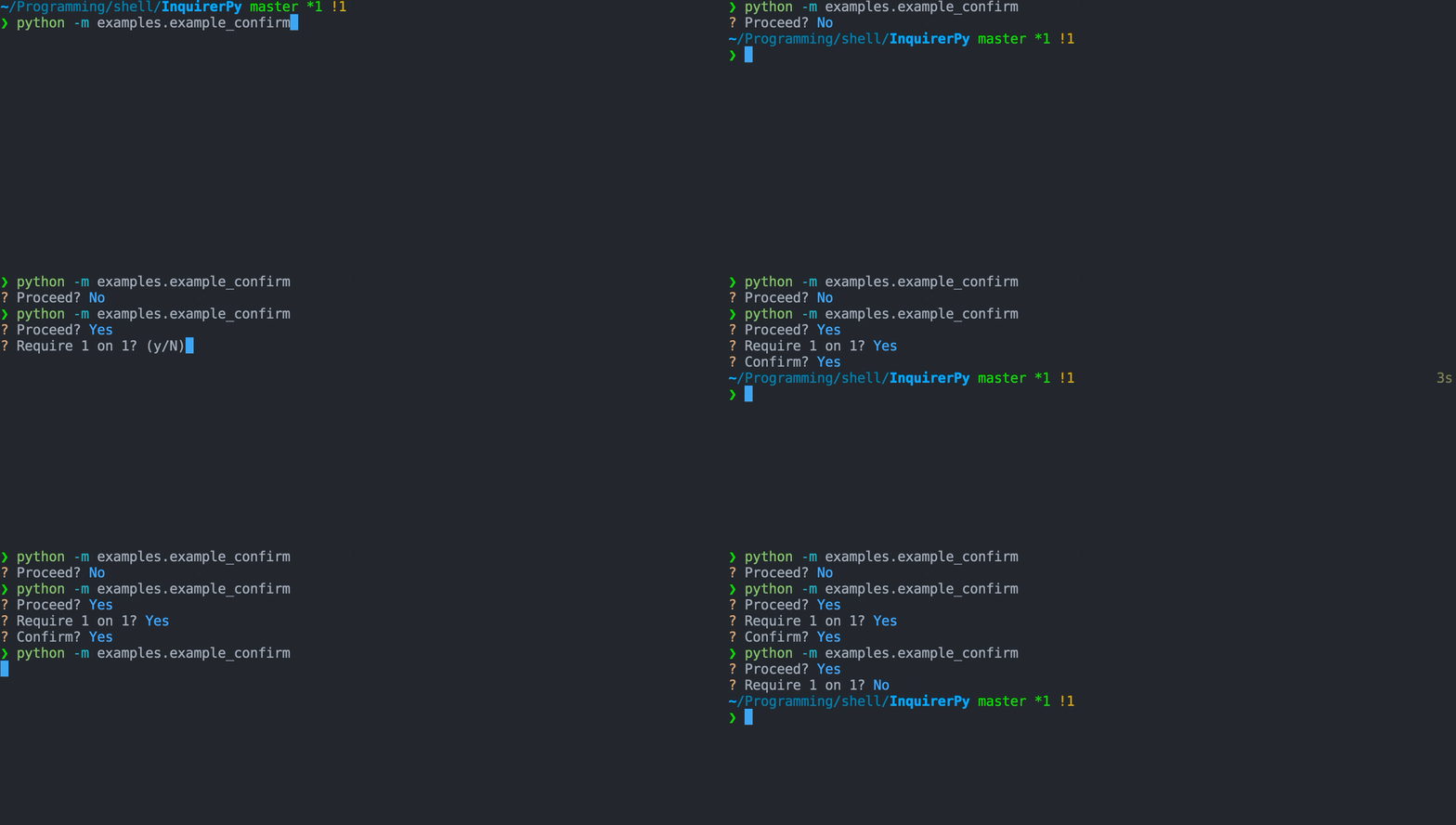
Classic Syntax (PyInquirer)
from InquirerPy import prompt


def main():
    questions = [
        {
            "type": "confirm",
            "message": "Proceed?",
            "name": "proceed",
            "default": True,
        },
        {
            "type": "confirm",
            "message": "Require 1 on 1?",
            "when": lambda result: result["proceed"],
        },
        {
            "type": "confirm",
            "message": "Confirm?",
            "when": lambda result: result.get("1", False),
        },
    ]

    result = prompt(questions)


if __name__ == "__main__":
    main()
Alternate Syntax
from InquirerPy import inquirer


def main():
    proceed, service, confirm = False, False, False
    proceed = inquirer.confirm(message="Proceed?", default=True).execute()
    if proceed:
        service = inquirer.confirm(message="Require 1 on 1?").execute()
    if service:
        confirm = inquirer.confirm(message="Confirm?").execute()


if __name__ == "__main__":
    main()
Keybindings
See also
{
    "answer": [{"key": "enter"}],   # answer the prompt
    "interrupt": [{"key": "c-c"}],  # raise KeyboardInterrupt
    "skip": [{"key": "c-z"}],   # skip the prompt
}
Besides the default keybindings, keybindings will be created for the parameter confirm_letter and reject_letter which
by default are y and n respectively.
Pressing y will answer the prompt with the value True and n will answer the prompt with the value False.
{
    "confirm": [{"key": "y"}, {"key": "Y"}],  # confirm the prompt
    "reject": [{"key": "n"}, {"key": "N"}],   # reject the prompt
}
Using Different Letters For Confirm/Deny
Tip
You can also change the letter by using the keybindings parameter and change the value for “confirm” and “reject” key.
In certain scenarios using Y/y for “yes” and N/n for “no” may not
be appropriate (e.g. multilingual).
You can change this behavior by customising the following parameters:
confirm_letterreject_lettertransformer
Hint
Changing the transformer is also necessary as the default behavior will print Yes for True
value and No for False value.
Note
This have effects on keybindings, new keybindings will be created based on the value of confirm_letter and reject_letter
to answer the question with True/False.
Classic Syntax (PyInquirer)
from InquirerPy import prompt

questions = [
  {
    "type": "confirm",
    "default": True,
    "message": "Proceed?",
    "confirm_letter": "s",
    "reject_letter": "n",
    "transformer": lambda result: "SIm" if result else "Não",
  }
]

result = prompt(questions=questions)
Alternate Syntax
from InquirerPy import inquirer

inquirer.confirm(
    message="Proceed?",
    default=True,
    confirm_letter="s",
    reject_letter="n",
    transformer=lambda result: "SIm" if result else "Não",
).execute()
Default Value
The parameter default controls 2 behaviors for the prompt.
It affects how the instruction is displayed, whether the confirm_letter is capitalised or reject_letter is capitalised.
It affects what value to be returned when user directly hit the key enter instead of the confirm_letter or reject_letter.
By default, since default value is False, the reject_letter is capitalised.
? Proceed? (y/N)
If default is True, the confirm_letter is capitalised.
? Proceed? (Y/n)
Reference
- class InquirerPy.prompts.confirm.ConfirmPrompt(message, style=None, default=False, vi_mode=False, qmark='?', amark='?', instruction='', long_instruction='', transformer=None, filter=None, keybindings=None, wrap_lines=True, confirm_letter='y', reject_letter='n', raise_keyboard_interrupt=True, mandatory=True, mandatory_message='Mandatory prompt', session_result=None, input=None, output=None)[source]
Create a prompt that provides 2 options (confirm/deny) and controlled via single keypress.
A wrapper class around
PromptSession.- Parameters:
message (str | Callable[[InquirerPySessionResult], str]) – The question to ask the user. Refer to message documentation for more details.
style (InquirerPyStyle | None) – An
InquirerPyStyleinstance. Refer to Style documentation for more details.vi_mode (bool) – Used for compatibility .
default (Any | Callable[[InquirerPySessionResult], Any]) – Set the default value of the prompt, should be either True or False. This affects the value returned when user directly hit enter key. Refer to default documentation for more details.
qmark (str) – Question mark symbol. Custom symbol that will be displayed infront of the question before its answered.
amark (str) – Answer mark symbol. Custom symbol that will be displayed infront of the question after its answered.
instruction (str) – Short instruction to display next to the question.
long_instruction (str) – Long instructions to display at the bottom of the prompt.
transformer (Callable[[bool], Any] | None) – A function which performs additional transformation on the value that gets printed to the terminal. Different than filter parameter, this is only visual effect and won’t affect the actual value returned by
execute(). Refer to transformer documentation for more details.filter (Callable[[bool], Any] | None) – A function which performs additional transformation on the result. This affects the actual value returned by
execute(). Refer to filter documentation for more details.keybindings (Dict[str, List[Dict[str, str | FilterOrBool | List[str]]]] | None) – Customise the builtin keybindings. Refer to keybindings for more details.
wrap_lines (bool) – Soft wrap question lines when question exceeds the terminal width.
confirm_letter (str) – Letter used to confirm the prompt. A keybinding will be created for this letter. Default is y and pressing y will answer the prompt with value True.
reject_letter (str) – Letter used to reject the prompt. A keybinding will be created for this letter. Default is n and pressing n will answer the prompt with value False.
raise_keyboard_interrupt (bool) – Raise the
KeyboardInterruptexception when ctrl-c is pressed. If false, the result will be None and the question is skiped.mandatory (bool) – Indicate if the prompt is mandatory. If True, then the question cannot be skipped.
mandatory_message (str) – Error message to show when user attempts to skip mandatory prompt.
session_result (Dict[str | int, str | bool | List[Any] | None] | None) – Used internally for Classic Syntax (PyInquirer).
input (Input | None) – Used internally and will be removed in future updates.
output (Output | None) – Used internally and will be removed in future updates.
Examples
>>> from InquirerPy import inquirer
>>> result = inquirer.confirm(message="Confirm?").execute()
>>> print(result)
True